Project update 4 of 5
A Look Inside Our Firmware
by James B
Earlier I wrote about TermDriver’s hardware development, and the technology of making tiny text readable. But another thing that I’m quite proud of is the firmware that’s inside TermDriver.
The firmware is all written in plain old C99 using the excellent Pico SDK. It’s really a pleasure to use their libraries, something I rarely experience with software provided by a hardware vendor.
The Main Thing
First and foremost, TermDriver’s job is to pass traffic between the UART and the USB port. That’s obviously what you want from this device. But it also needs to update the screen, redrawing it for every single character that comes through. For the terminal to be an accurate log of the traffic, TermDriver cannot ever drop a single character, otherwise the screen would be corrupt.
Graphics Bandwidth
The screen on TermDriver is a surprisingly bright 240x240 LCD, controlled by an ST7789. The RP2040 that’s running the show is connected by an SPI interface to the ST7789, which refreshes the LCD at around 60 Hz. That dictates the goal: for the display to look crisp and snappy, the RP2040 needs to redraw the screen at 60 Hz. That’s 13.3 ms per redraw. Can this be done?
The answer is yes, but it takes a lot of bandwidth for a microcontroller: 240x240 pixels at 18 bits per pixel at 60 fps comes out to 62 Mbit/s over the SPI bus. That’s on the edge of the maximum rate for the RP2040.

Fortunately, there’s a clever trick, although it costs a little bit of image quality. Instead of running 18 bits per pixel, the ST7798 can run in a 12 bit per pixel mode (i.e., four bits each for red, green and blue). This reduces the theoretical SPI bandwidth to 41 Mbit/s. Much safer. Cutting this corner also makes the RP2040 color code considerably faster.
Dual Core Action
RP2040 is a true dual-core microcontroller. This is what makes TermDriver possible. One core handles the communications between USB and the UART and updates a block of memory that represents the screen as an array of characters and colors.
The second core reads from this in-memory screen, does the math to figure out the pixels, and writes this data over SPI (using the RP2040’s awesome DMA) to the display.
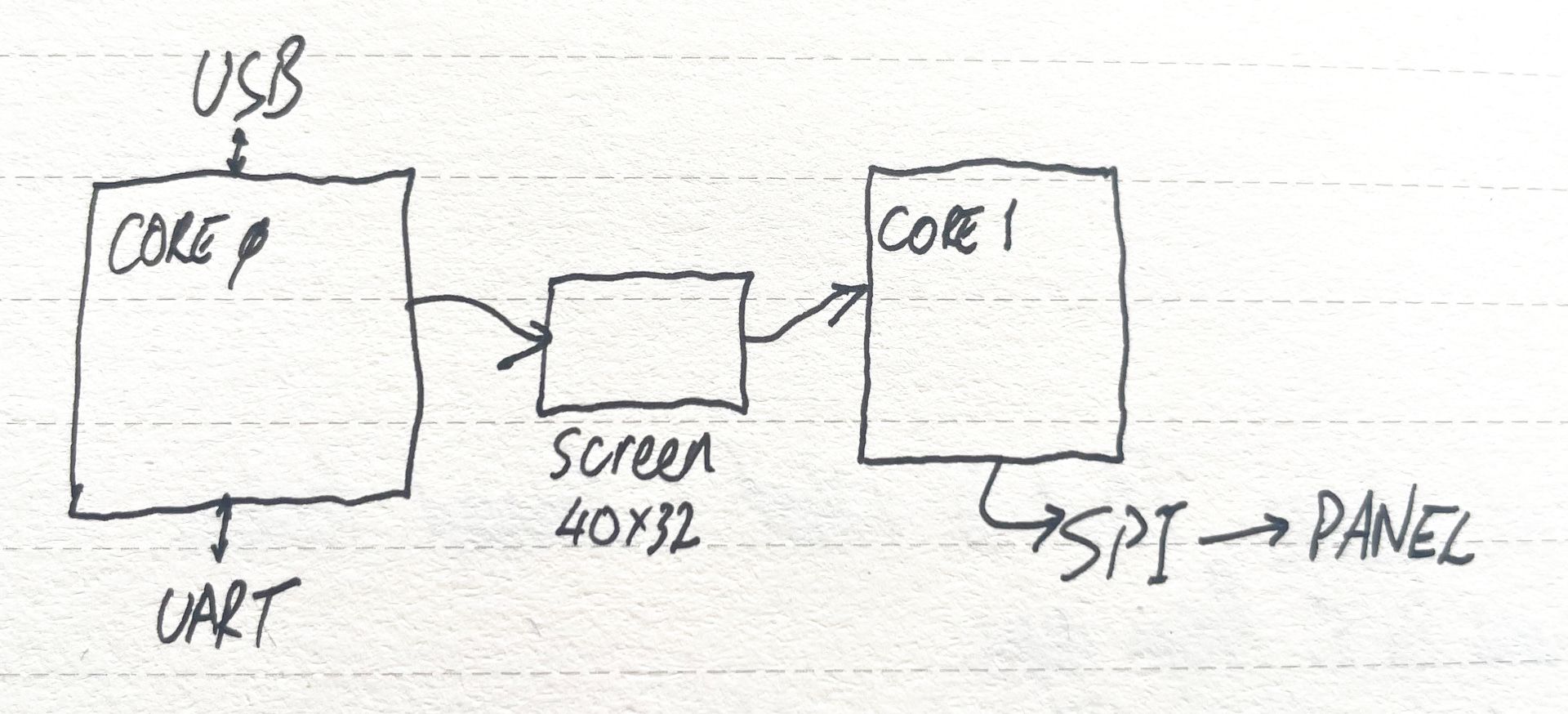
The beauty of this cunning scheme is that even if the data is coming through really fast, changing the whole screen hundreds of times per second, the display updates still happen at a steady 60 Hz. Each 60 Hz tick you see a snapshot of the instantaneous terminal state, guaranteed.
Racing the Beam
One thing that increases visual quality is reducing “tearing” — seeing visible partial updates on the screen at the same time. The expensive solution to this is double-buffering, something that the EVE chip in the Gameduino supports in hardware. The ST7789 doesn’t support double-buffering; there’s only enough RAM inside for the visible pixels. But again there is a simple old-school trick that helps. Sometimes called “racing the beam,” the is to time the video writes exactly so they immediately follow the scanout line. That’s what the rendering thread does. It waits for the vertical refresh, then repaints all the pixels slightly more slowly than the scanout, so on with the next frame. The result? Smoother scrolling and screen updates.