Project update 4 of 4
CortEX - Open-Source Meditation Enhanced by Brain and Heart Signals
by Aman Maheshwari, Anuranan Kakati, Ritika Mishra, Ritu Dhillon, Krishnanshu Mittal, Rup Jyoti BharadwajCurious about what’s happening inside your mind and body during meditation?
CortEX is an open-source platform that brings together mindfulness and real-time monitoring of your brain and heart activity.
Disclaimer:
CortEX application is an open-source, free-to-use software designed to work with Neuro PlayGround Lite.
It is a wellness and research tool, not a medical application and should not be treated like one.
There is no warranty; you may use it at your own risk. By using the application, you agree to these terms.
Overview
CortEX captures your brainwaves (EEG) and heart rhythms (ECG), giving you instant feedback on your mental and physical state as you meditate.
No more guesswork—see your focus, relaxation, and calmness visualized with easy-to-understand graphics.
This guide covers:
- Setting up CortEX
- Connecting with Neuro PlayGround Lite (NPG Lite)
- Tracking your meditation journey with live data
Let’s dive in! 🚀
EEG: Understanding Brain Activity
Electroencephalography (EEG) records the brain’s electrical signals, revealing patterns linked to different mental states.
❤️ ECG: Monitoring Your Heart
Electrocardiogram (ECG) tracks the heart’s electrical activity, showing how fast and regularly it beats using skin electrodes.
⚙️ How CortEX Operates
- ECG delivers real-time heart rate and heart rate variability (HRV) insights—helpful for understanding stress and relaxation.
- EEG identifies your current mental state—whether you’re focused, relaxed, or meditative.
CortEX connects wirelessly to NPG Lite, streaming EEG and ECG data to a web app for visualization and analysis.
👉 During meditation, CortEX provides live feedback on your focus and heart rhythms.
👉 Afterward, you receive a detailed summary to help you reflect and improve.
⚠️ Note:
CortEX is open-source and intended for wellness and research. It is not a medical device. Use responsibly.
What You’ll Need
NPG LiteVibz Playmate (or any Playmate)7 BioAmp Snap Cables with baby gel electrodesOR7 alligator cables with tab electrodesNuprep skin preparation gel (Optional)Alcohol swabLaptop
Software Checklist
- NPG Lite Flasher
- CortEX Web App
About NPG Lite
Neuro PlayGround Lite is a compact, wireless amplifier for recording EMG, ECG, EOG, and EEG signals.
- Adafruit Feather form factor
- Wi-Fi, Bluetooth, Zigbee, Thread connectivity
- Patient safety and ESD protection
- LEDs, buttons, LiPo charging, USB-C
- Ideal for research, education, and wearable projects
Preparing Your Skin
For best results:
- Apply Nuprep Gel to electrode sites
- Gently rub to exfoliate and lower skin resistance
- Clean with an alcohol swab
Electrode Placement Guide
| Channel | Placement |
|---|---|
| A0P | Right Frontal (FP2) |
| A0N | Behind Right Ear |
| A1P | Left Frontal (FP1) |
| A1N | Behind Left Ear |
| A2P | Left Chest |
| A2N | Beside A2P |
| REF | Right Chest |
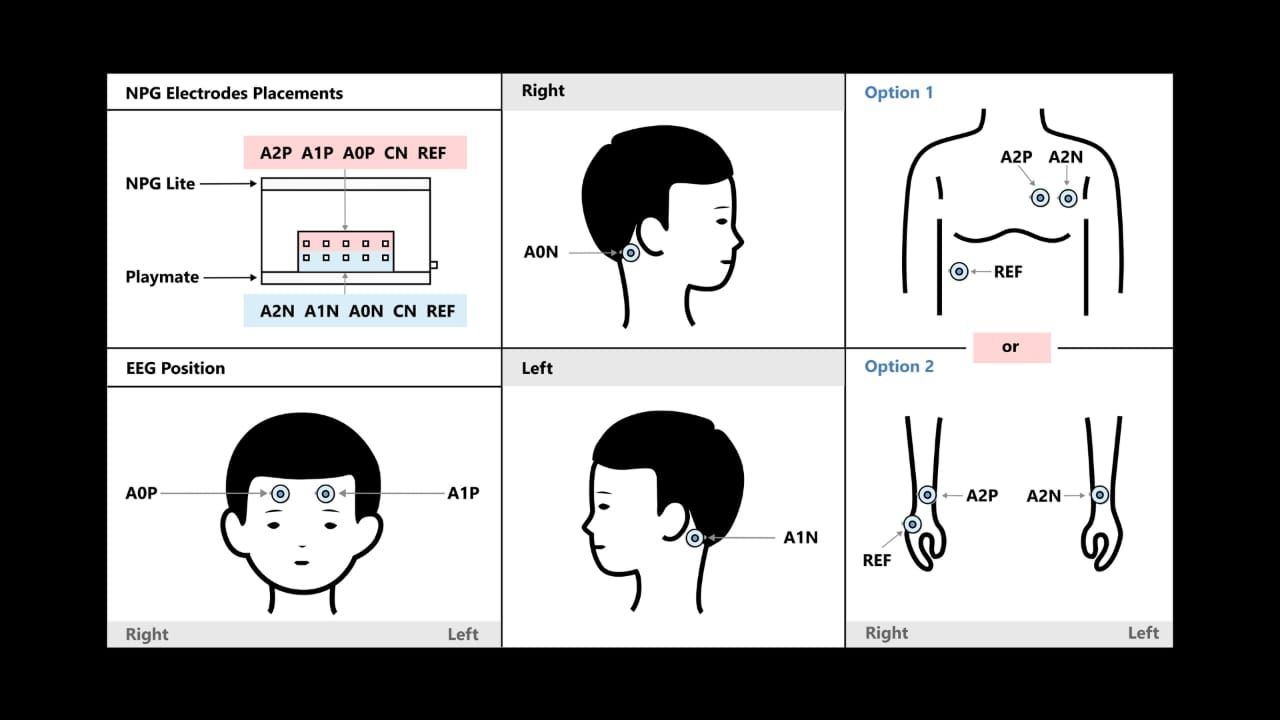
Alternate ECG (Wrist Setup)
- REF cable → Back of right hand
- Positive (A2P) → Front of right wrist
- Negative (A2N) → Left wrist
👉 Always clean skin with alcohol wipes for optimal signal quality.
⚡ Getting Started: Setup & Streaming
- Download the Flasher:
- Download the NPG Lite Flasher from: github.com/upsidedownlabs/NPG-Lite-Flasher
- Install and launch the application
- Flash the Firmware:
- Connect your NPG Lite via USB-C cable
- Select BLE firmware (required for these projects).
- Identify the correct port
- Click "Flash"
- Open CortEX Web App
- Visit: CortEX App on chromium based browsers
- Connect Your Device
- Power on NPG Lite
- Click Connect in the app
- Works offline after first load
- Enable Bluetooth
- Select your device
See Help & Troubleshooting if you have connection issues.
Column 2 – Brainwave Insights
- Radar chart: Delta, Theta, Alpha, Beta, Gamma
- Live EEG signals (left/right hemispheres)
Column 3 – Heart Metrics
- Live BPM
- HRV stats (intervals)
- Real-time ECG waveform
Live Feedback
EEG Brainwaves
| Wave | Frequency | State |
|---|---|---|
| Delta | 0.5–4 Hz | Deep sleep, restoration |
| Theta | 4–8 Hz | Meditation, creativity |
| Alpha | 8–12 Hz | Calm, peaceful |
| Beta | 12–30 Hz | Focused, alert |
| Gamma | 30–45 Hz | Memory, cognition |
Heart Rate & HRV
- High HRV: Relaxed, parasympathetic
- Low HRV: Stressed, sympathetic
Hemisphere Balance
- Left: Analytical, tension
- Right: Emotional, daydreaming
- Balanced: Calm, centered
Session Summary
After each session, CortEX generates:
- EEG timeline with dominant waves
- Mental state classification
- Session score and insights
Technical Details
- Next.js + React for UI
- Web Bluetooth API for device connection
- Web Workers for signal processing
- WebGL + Recharts for visualization
- Tailwind CSS for design
- Lucide Icons for graphics
How CortEX Stands Out
| Feature | Standard Apps | CortEX |
|---|---|---|
| EEG/ECG Integration | ❌ | ✅ |
| Real-Time Feedback | ❌ | ✅ |
| HRV Analysis | Limited | ✅ |
| Open Source | ❌ | ✅ |
| Hemisphere Tracking | ❌ | ✅ |
| Offline Mode | ❌ | ✅ |
Learn & Build
Want to see CortEX in action or build your own setup? Explore these resources:
Video Demonstration:
Watch a guided walkthrough of CortEX and its meditation feedback: CortEX Demo VideoAssembly & Setup Guide:
Step-by-step instructions for hardware assembly and device configuration: Neurofeedback Meditation Journey
These resources will help you assemble, connect, and interpret your meditation data.
What’s Next?
Currently, CortEX supports two-channel EEG and one-channel ECG.
Planned updates will focus on enhancing feedback and tracking features, such as:
✨ Advanced meditation feedback
✨ Emotional state tracking
Stay tuned for more possibilities!
Help & Troubleshooting
Device Not
- For signal tips: Signal Acquisition Tips
- Check USB-C cable connection
- Install ESP32 drivers if on Arduino
- Try different USB port
- Try putting your device to BOOT mode (BOOT + RESET) to flash the firmware
Poor Signal Quality
- Clean skin with alcohol wipes before electrode placement
- Press electrodes firmly to ensure good gel contact
- Minimize movement during recording
- Check all connections are secure
- Make sure you're at least 5 meters away from AC appliances
Bluetooth Issues
- Bluetooth should be enabled on the system
- Ensure BLE firmware is flashed correctly
- Check device is powered on (LED indicators)
- Clear browser cache and reload
- Move the device closer to the system (within 10 meters)
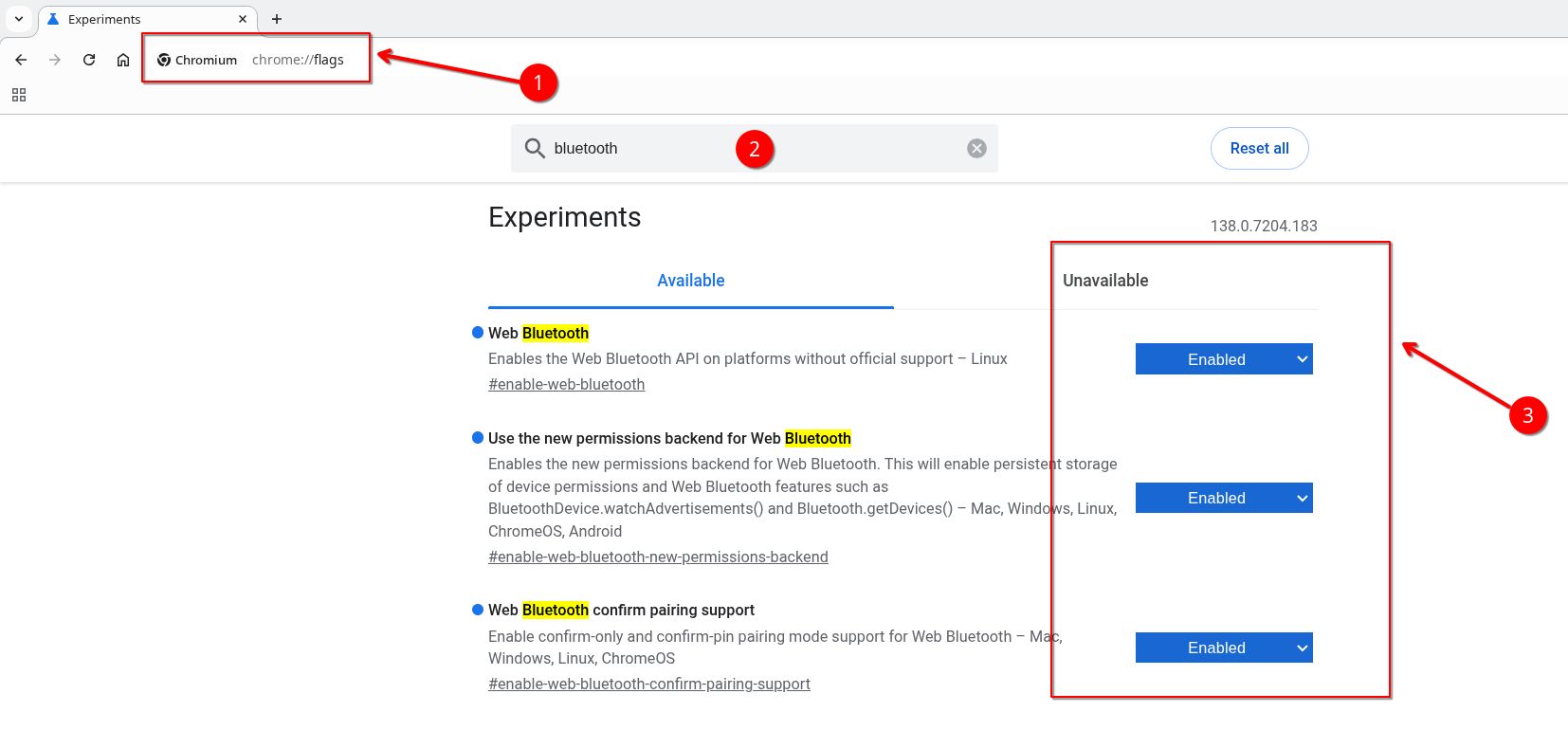
If you still face issues connecting to your device via bluetooth, follow these steps and try again:
- Go to you chromium based browser
- Type chrome://flags in the search bar and hit enter
- Search for Bluetooth and enable everything related to Web Bluetooth
- Restart your browser
- Try connecting again
Exciting new projects and tutorials are on the way. Neuro PlayGround Lite is just getting started! Get yours today
Learn More:
- Official Documentation: docs.upsidedownlabs.tech
- Join our Discord: discord.gg/SzYRVz8xRw
- GitHub Projects: github.com/upsidedownlabs
💌 Questions or support?
Contact us